Making the financial literacy experience stress-free

Working with Extend-A-Family under UW Blueprint, I developed two features that helped reduce stress for both sides of the classroom; learners and teachers.
ROLE
Product Design
UX Research
TEAM
Product Managers (2)
Developers (~10)
Designers (3)
Myself!
TIMELINE
January 2025 - August 2025
TOOLS
Figma
OVERVIEW

8 months, 2 features, and PM/dev collaborations.

Over the course of eight months, I worked with UW Blueprint to design a financial literacy platform for Extend-A-Family (EAF) Waterloo Region, a nonprofit dedicated to assisting those with disabilities.

I was the sole designer for two key features: 1) a dashboard and bookmarks system for learners, and 2) a messages system between learners and teachers.
PROBLEM

Paper workbooks don’t scale.

One of EAF’s core programs is a financial literacy course delivered with paper workbooks. That format doesn’t scale. Learners can’t easily redo practice problems. Teachers can’t see where people are stuck without manually checking every workbook.

On paper, the brief was “build a digital version of the course.”

But the team realized there was a bigger opportunity—to reduce stress on both sides of the learning experience. The question became...

How might we reduce the stress of learning, so more energy goes into understanding money?

SOLUTION

Features that make sense both in and out of the classroom.

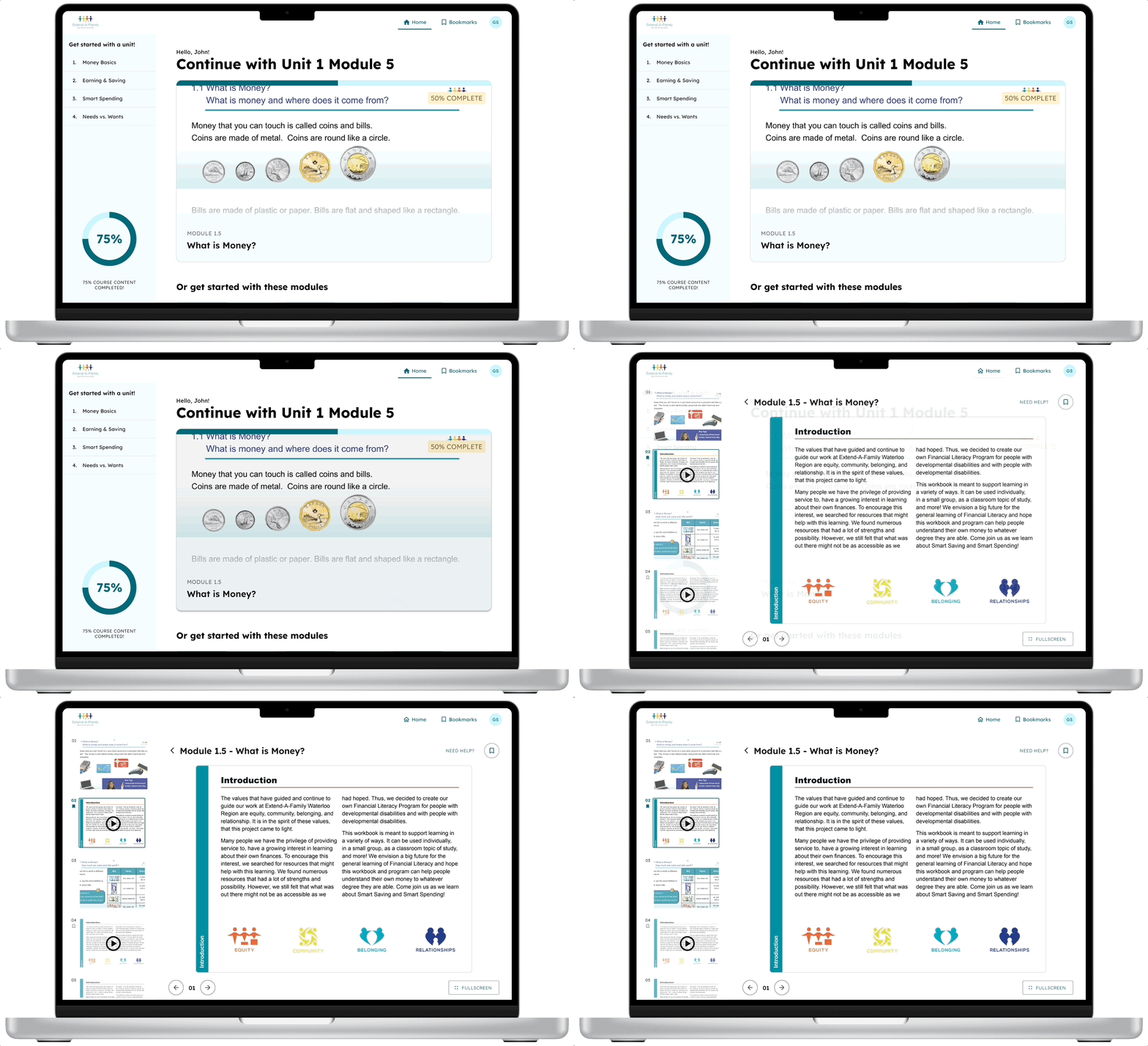
A mockup of someone clicking on a module in the dashboard, thus being able to start where they left off in the next screen.

LEARNERS GET QUICK ACCESS TO RELEVANT MODULES

No more sifting through units of modules. Quickly find the last module you worked on and get right to learning.
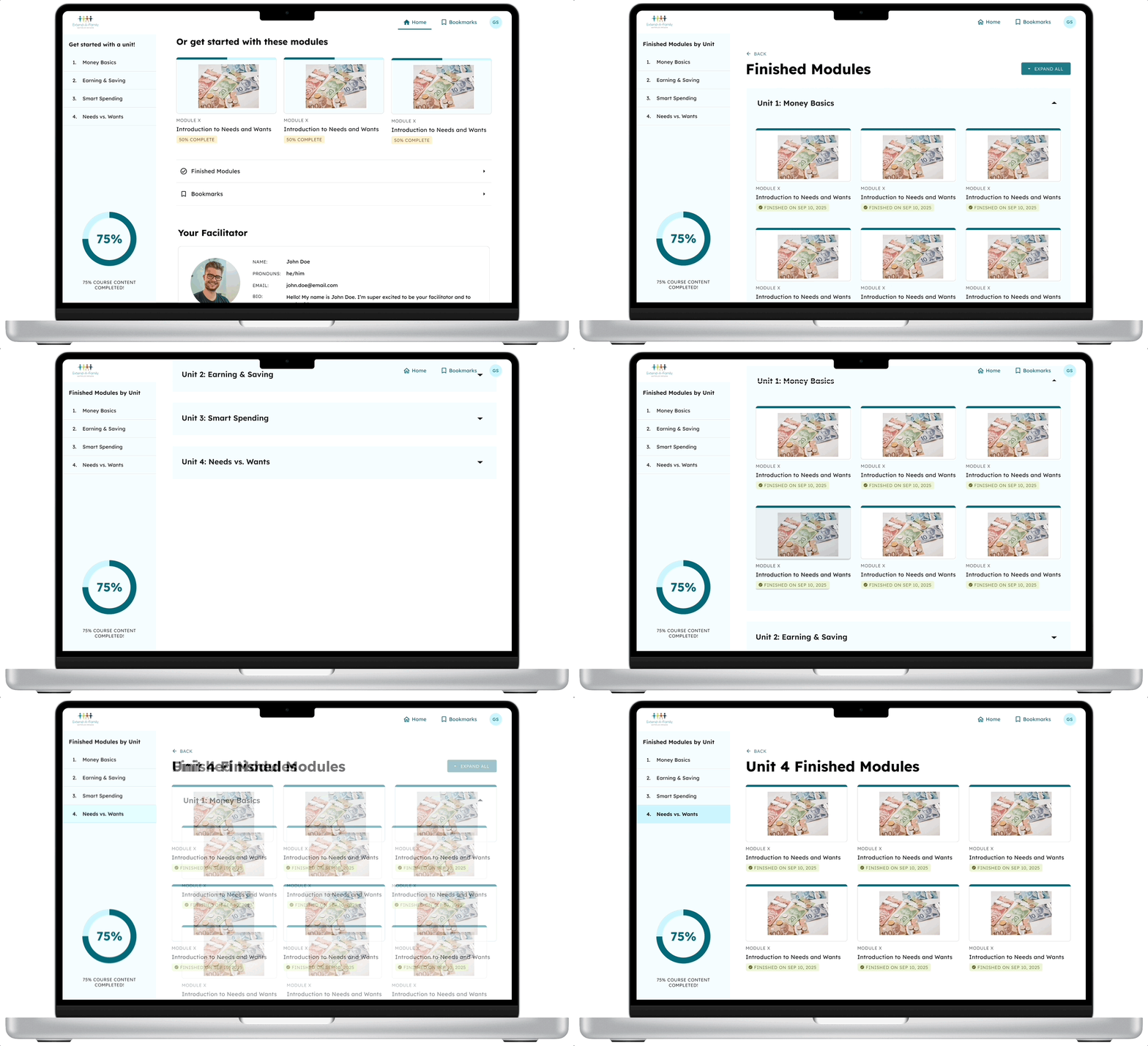
A mockup of someone clicking "Finished Modules" from the dashboard, thus being able to check their finished modules. They click on a specific unit to see the ones for that unit.

LEARNERS WATCH PROGRESS OVER TIME

With knowledge of which modules you completed, see your work stack up and your learnings grow.
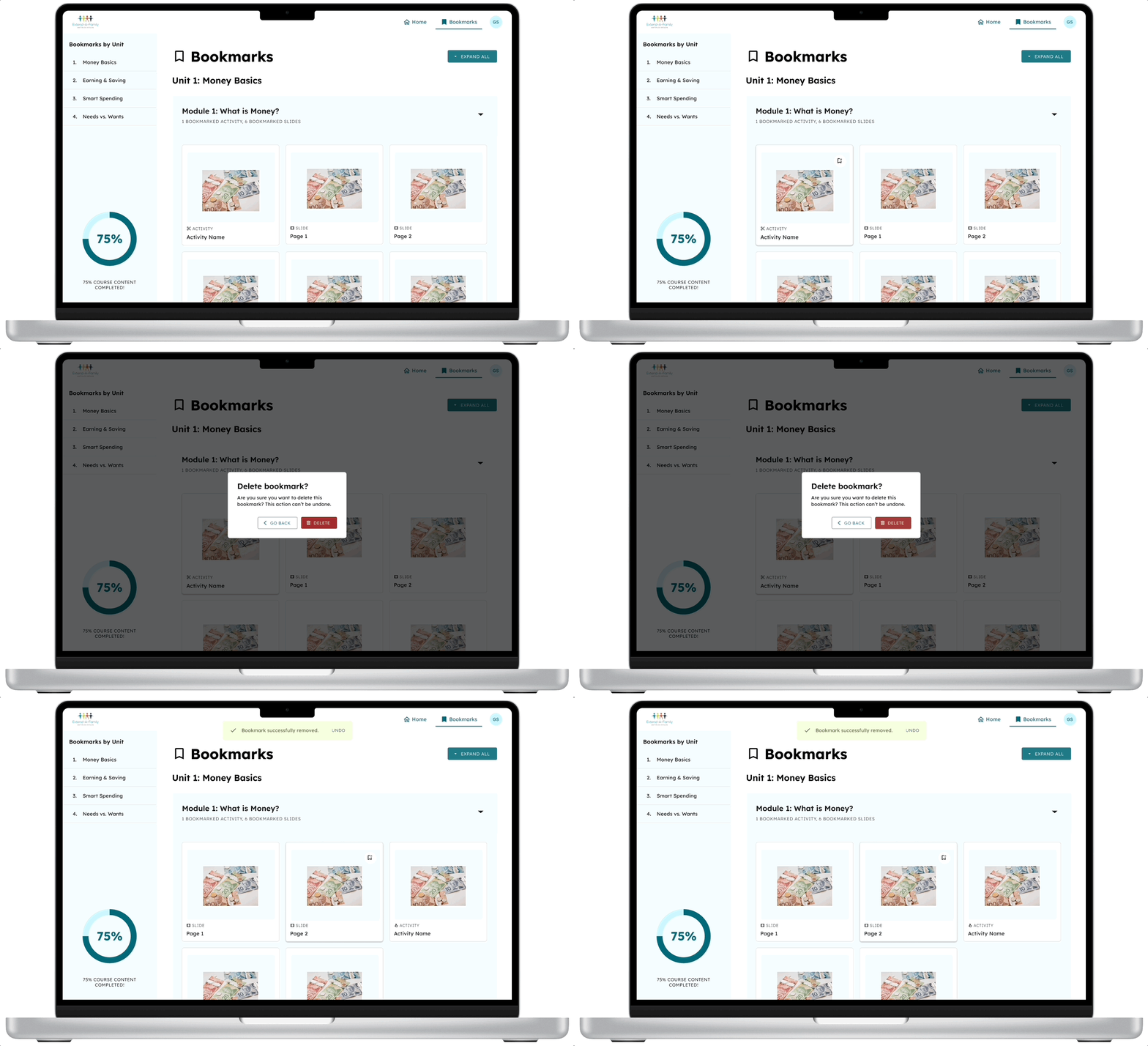
A bookmarks page, where a user deletes a bookmark and the bookmark is successfully removed.

LEARNERS CAN CURATE IMPORTANT ACTIVITIES AND SLIDES

Whether there was something valuable in one of the module slides, or an activity you particularly enjoyed, it's easier than ever to refer back to it quickly.

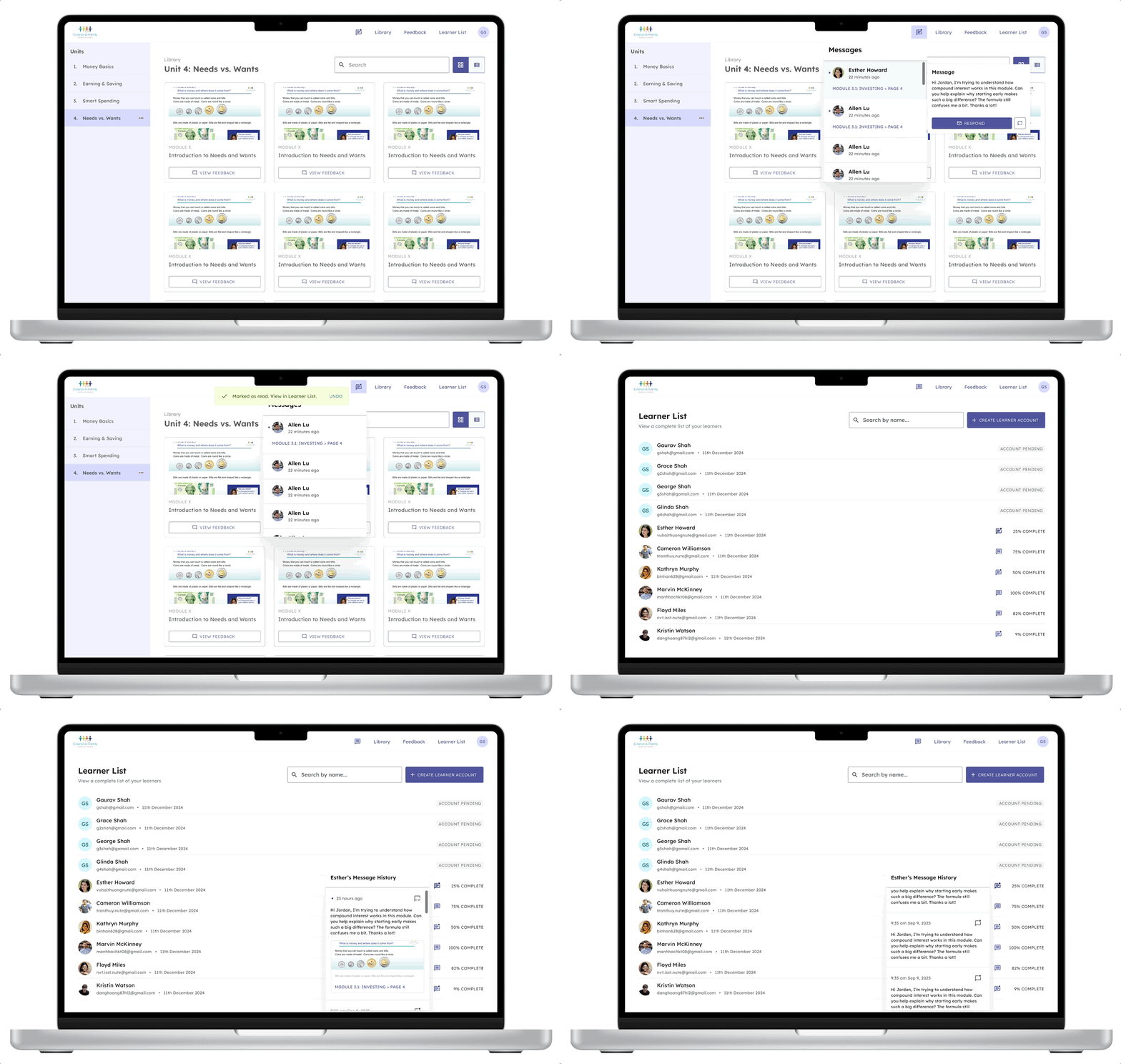
TEACHERS CAN PRIORITIZE MESSAGES IN THE MOMENT

No more stressing over whether you addressed a learner's question or not. Now all their questions are stored in a convenient place.
OUR USERS

In a classroom, friction can quickly lead to chaos.

The classroom journey involves a deep relationship that needs adequate feedback between learner and teacher. At multiple points, this journey can fail.
  • If learners don’t know how to get started, they don’t learn.
  • If a teacher is busy helping a learner, other learners have to wait for help.
  • If a teacher is overwhelmed, learners may fall through the cracks.
It was clear that I wasn’t working merely on two separate features, but two features within a broader classroom ecosystem.

Within the system, learners need to...

  • Complete modules in any order and number of times.
  • Feel heard when it comes to learning.
  • Have their disabilities accommodated.

While teachers need to...

  • Track progress of a small group of learners.
  • Effectively guide a diverse range of learners.
  • Manage a classroom in real time.
ACCEPTANCE CRITERIA

I mapped feature-oriented requirements to user needs.

When given acceptance criteria by my product managers, I got a list of actions a user should be able to do.
Before I started designing, I translated these into jobs to be done for each feature. These job stories allowed me to design with intent, instead of following checklists.

In a dashboard, learners need to...

  • See progress.
  • Save important activities and content for later.
  • Jump quickly to what they want to do.
  • Feel connected to the program.

In a messaging system, teachers need to...

  • Prioritize unread and unaddressed messages.
  • Respond to learners quickly.
  • Get familiarized with learners' concerns.
DESIGNING THE LEARNER SIDE

Dashboards and bookmarks were deceptively simple to design for.

Initially, I thought that these features would be simple to implement. However, I quickly realized that small decisions could dramatically affect usability.

Early explorations had usability issues.

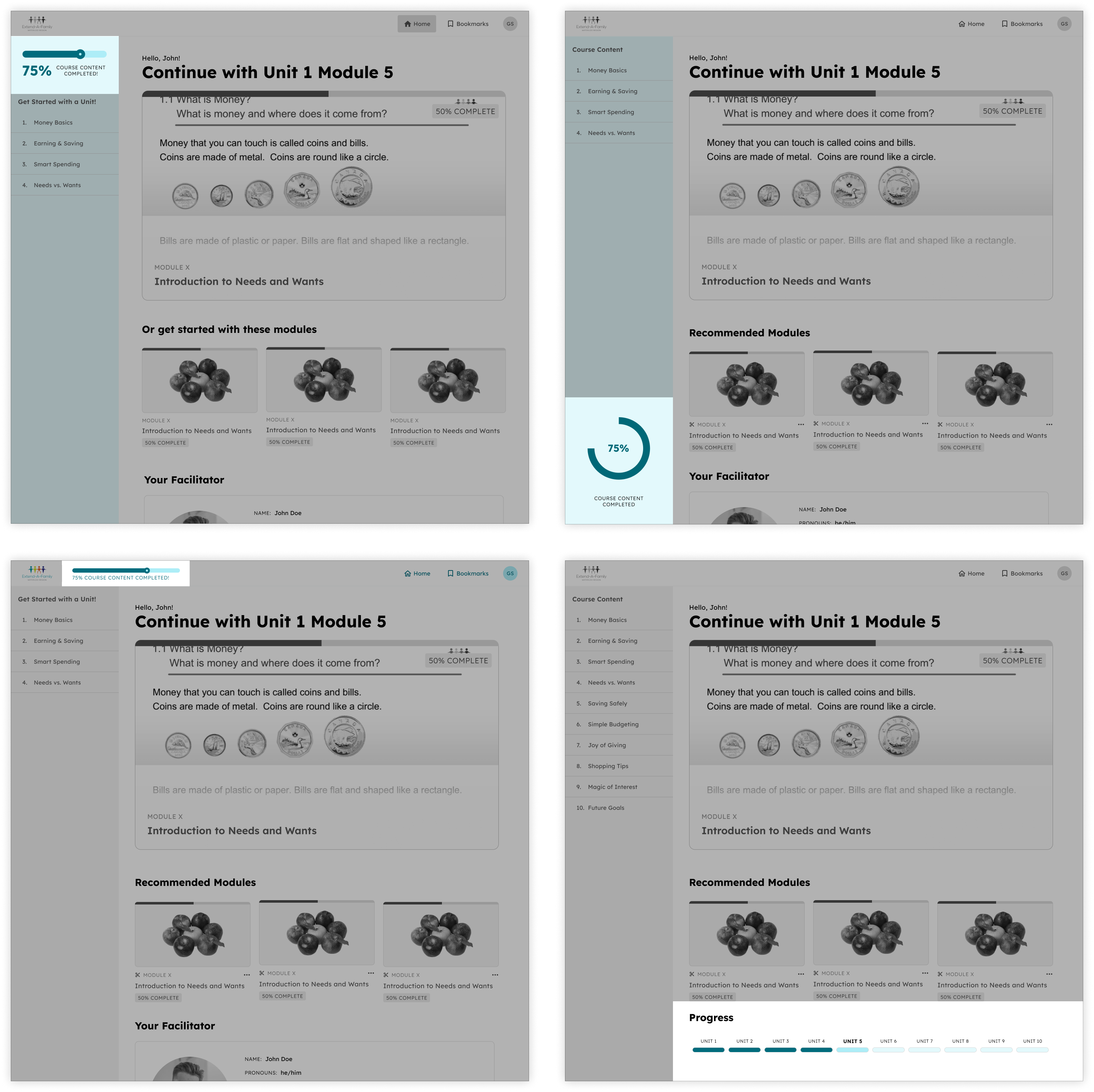
With the dashboard, I started with a low-fidelity wireframe from a former designer. However, I needed to modify it to add a progress indicator. Some of my explorations did not prominently surface this indicator.
PROGRESS BAR PLACEMENT EXPLORATIONS
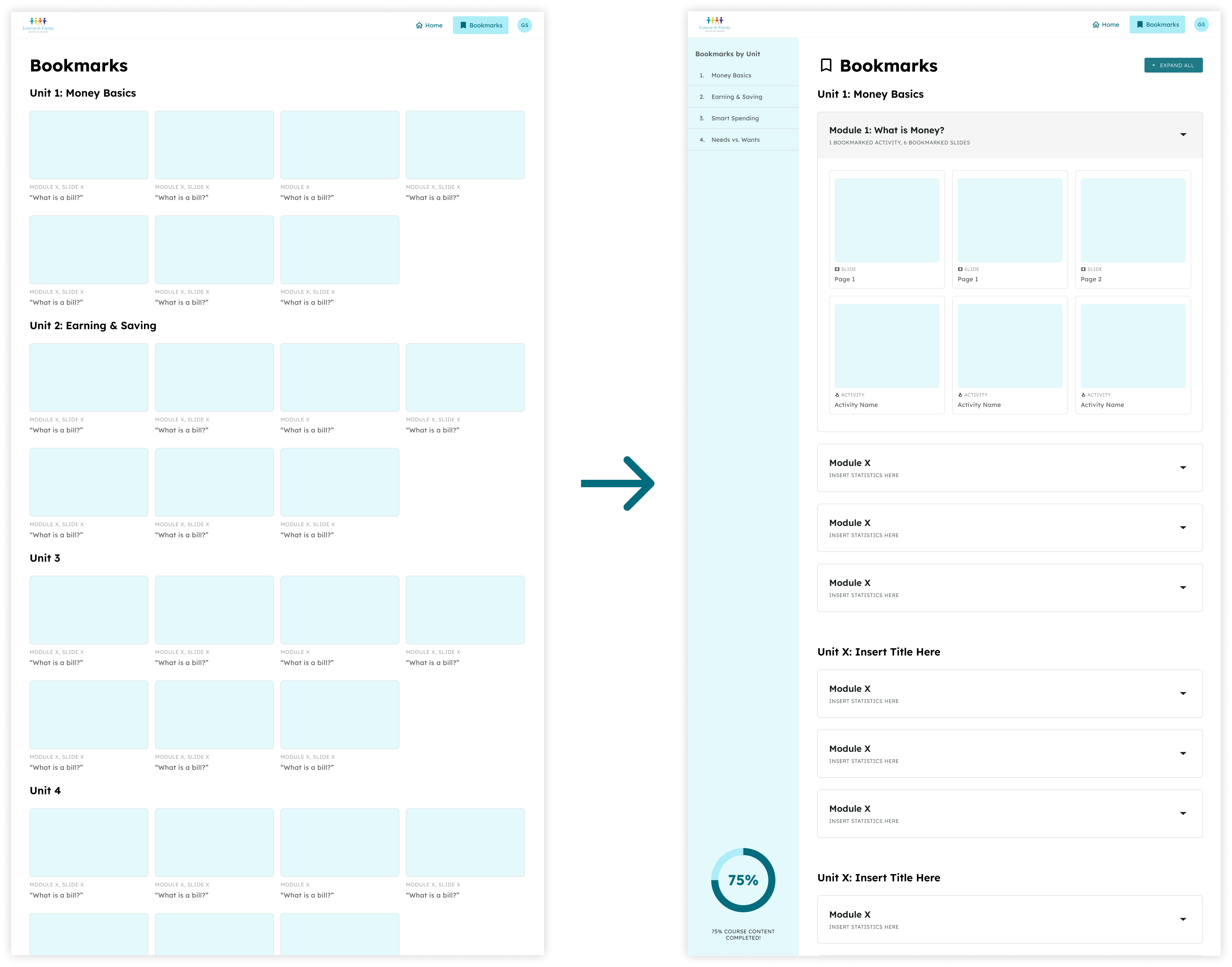
For bookmarks, I also jumped straight into high fidelity, expecting it to be trivial. But developer constraints removed filter controls, leading me to design a flat list of bookmarks that quickly became overwhelming.

I had to adjust my approach.

Our team aligned on the circular progress bar, choosing it for the greatest visibility. Its placement in the side panel also ensured learners could see their progress at all times (aside from completing a lesson).
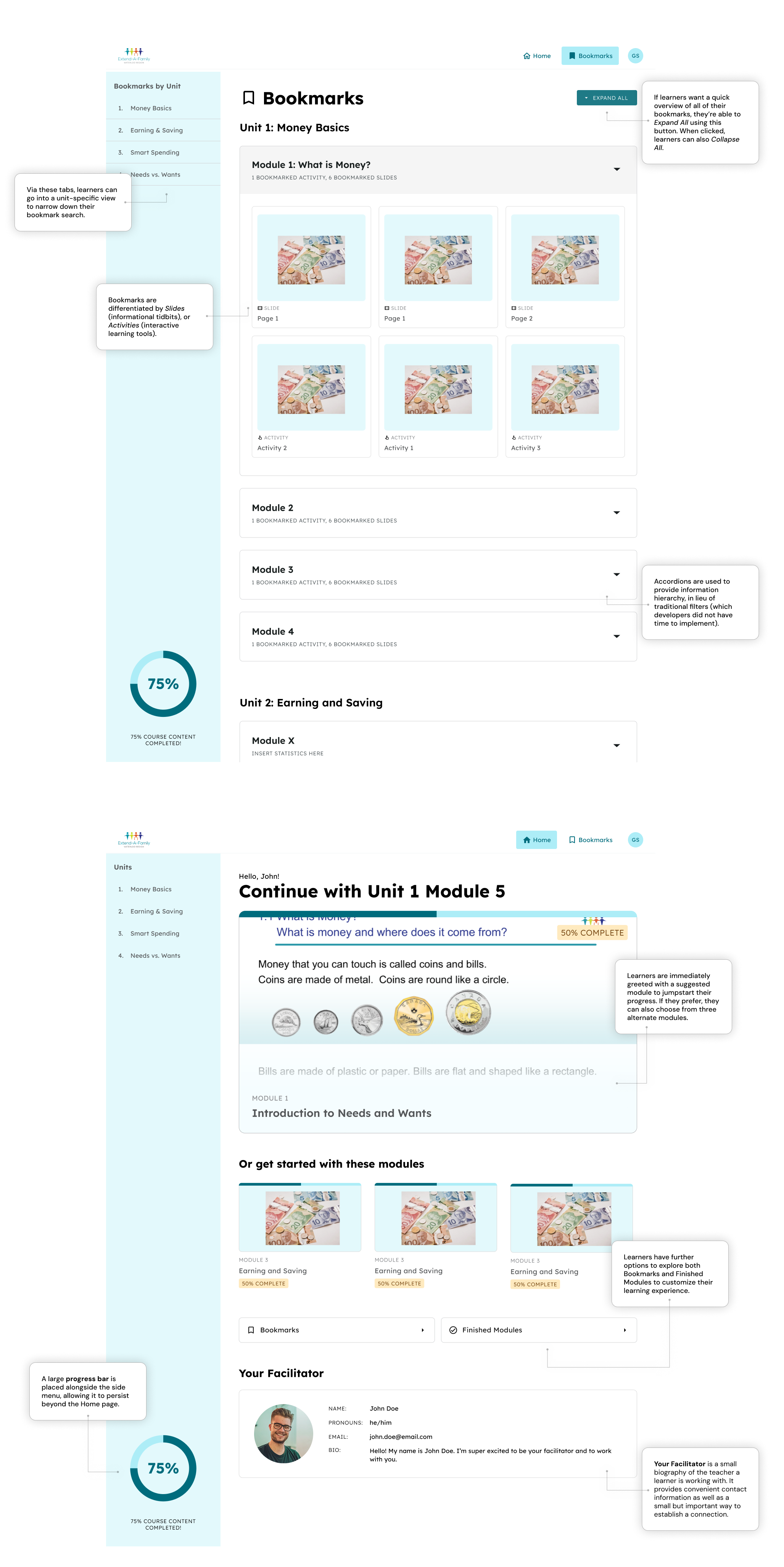
For bookmarks, I implemented information hierarchy through accordions and side tabs. This allowed learners to traverse content categories without being hit with a wall of bookmarks.
FROM DISASTER TO ORDER WITH BOOKMARKS
DESIGNING THE TEACHER SIDE

Notifications can be used in many different ways.

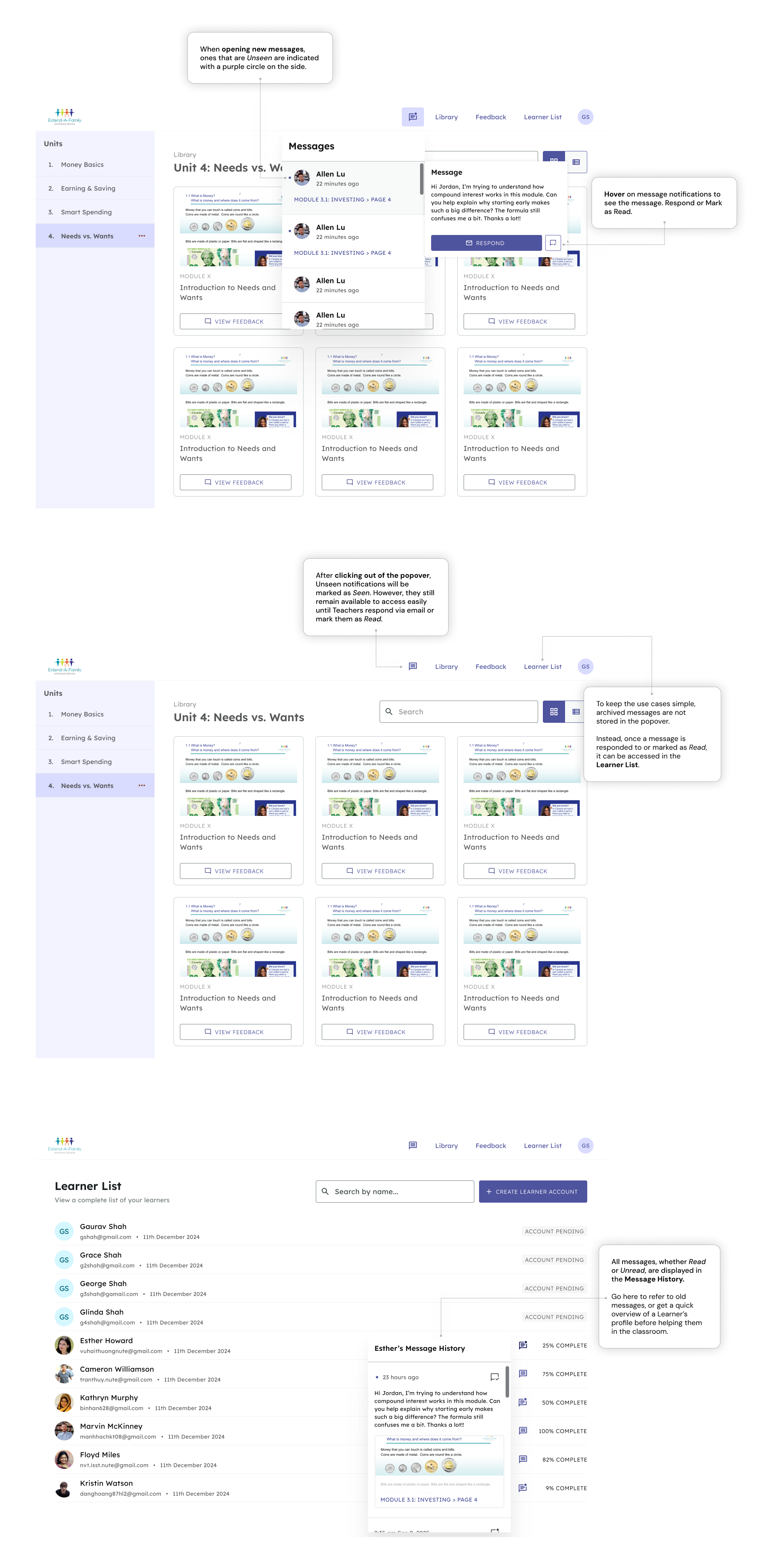
Many people respond differently to notifications. Some address them immediately, while others leave them to be dealt with later. These differences manifest in what a “Seen” vs. “Read” notification means, as well as how those notifications are treated in the platform.
A lack of clarity on these distinctions led to problems down the line, even when it seemed I did everything “correctly”.

I referenced best practices for notifications.

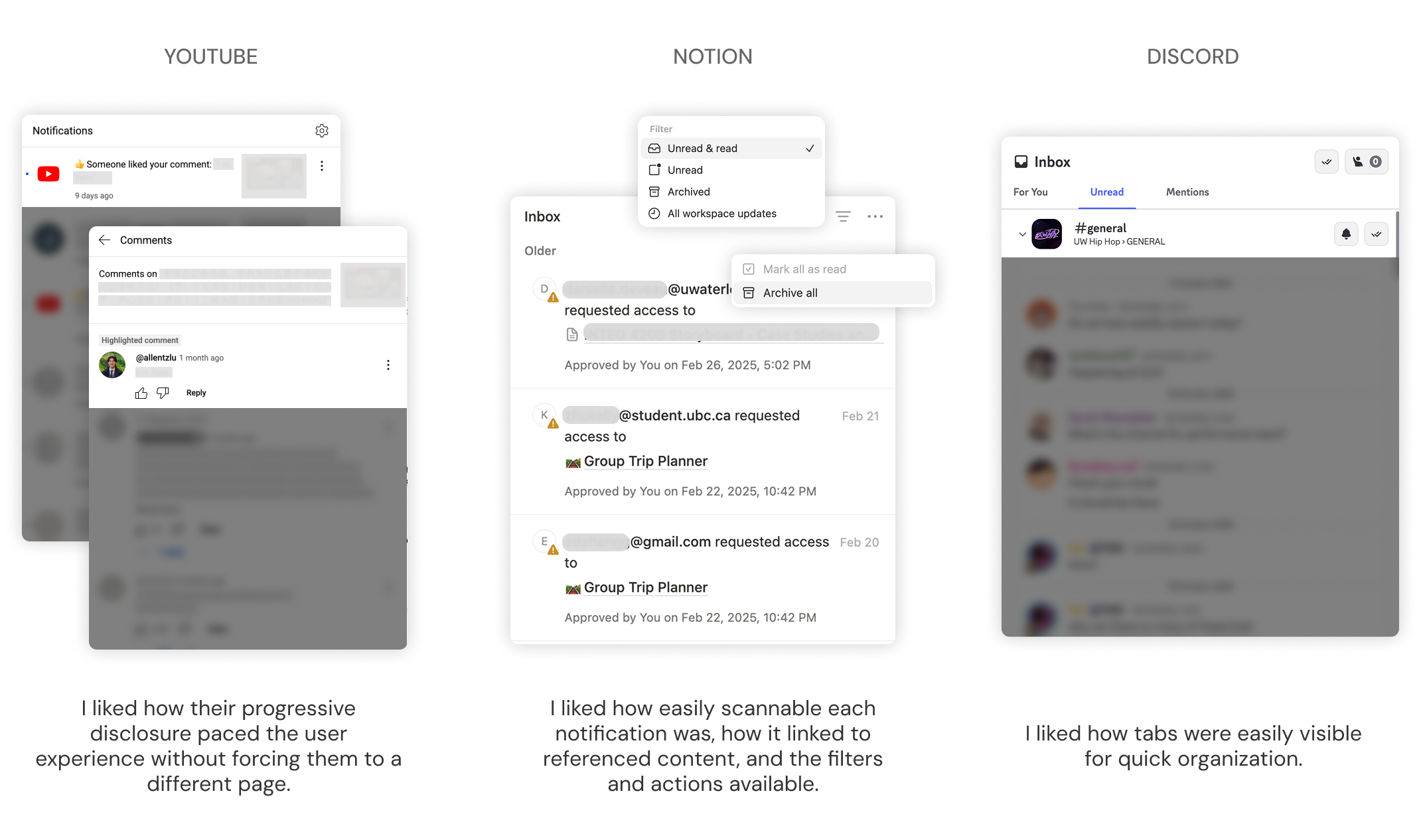
I referenced notification systems like YouTube, Discord and Notion. From this, I thought of features to incorporate, which included an easily scannable layout, references to relevant documents, and tabs to categorize messages.
DESK RESEARCH
EARLY EXPLORATIONS

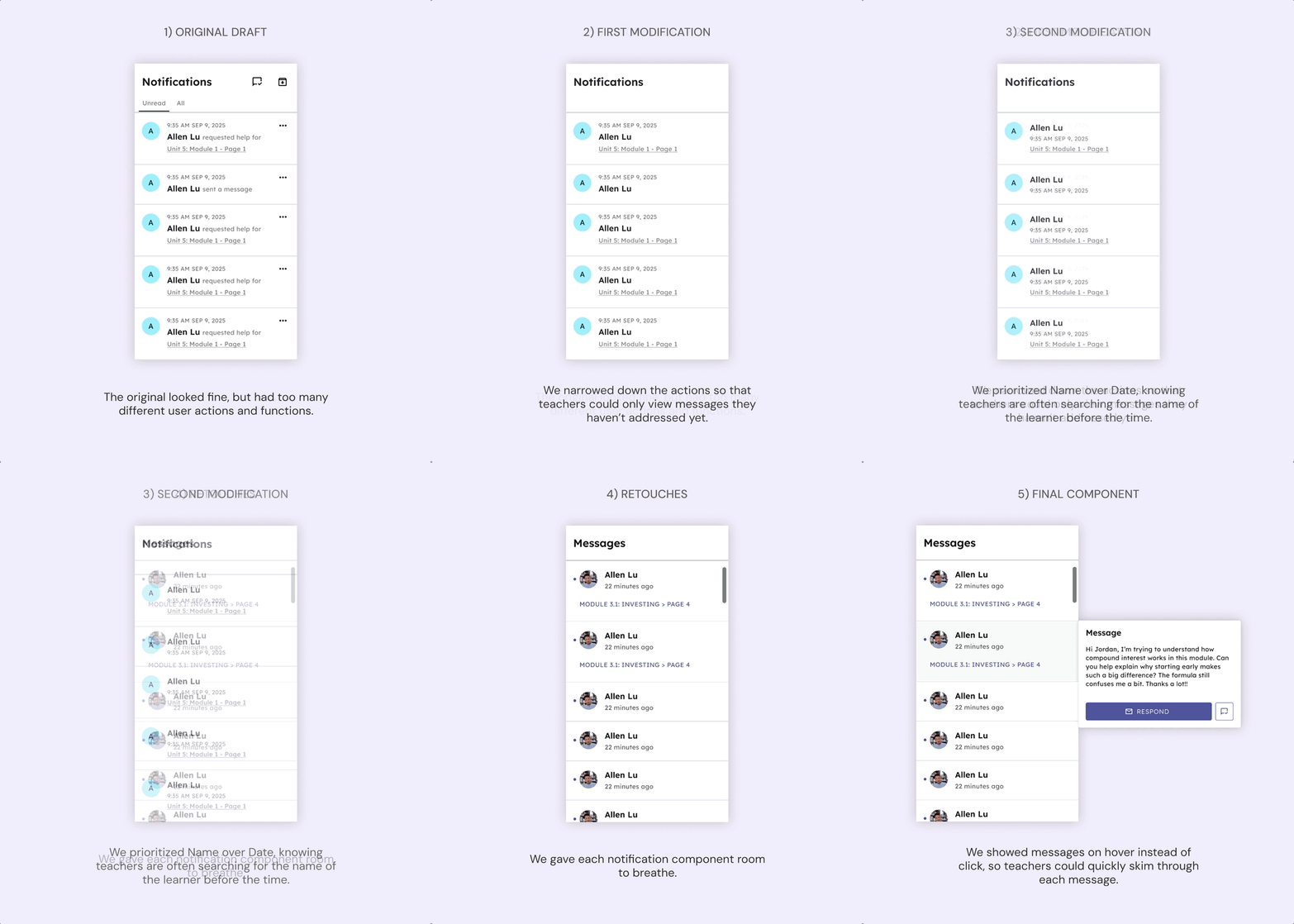
...But best practices does not equal fitting the needs of teachers.

Without a clear understanding of the user flow, I attempted to shove features into a singular component, leading to a component that looked “right” but would be overwhelming for teachers to use in the heat of the moment.

The PM and I sat down to re-examine the user flow.

We reworked the user flow to only feature unaddressed messages in the main component. Other messages were archived in learner profiles. This turned the component into a live triage list, allowing teachers to prioritize in the classroom.
We also designed for the 1000th use case, removing any words that would slow down a teacher in the classroom.
ITERATIONS (GIF THAT LOOPS)

There was still room for refinement.

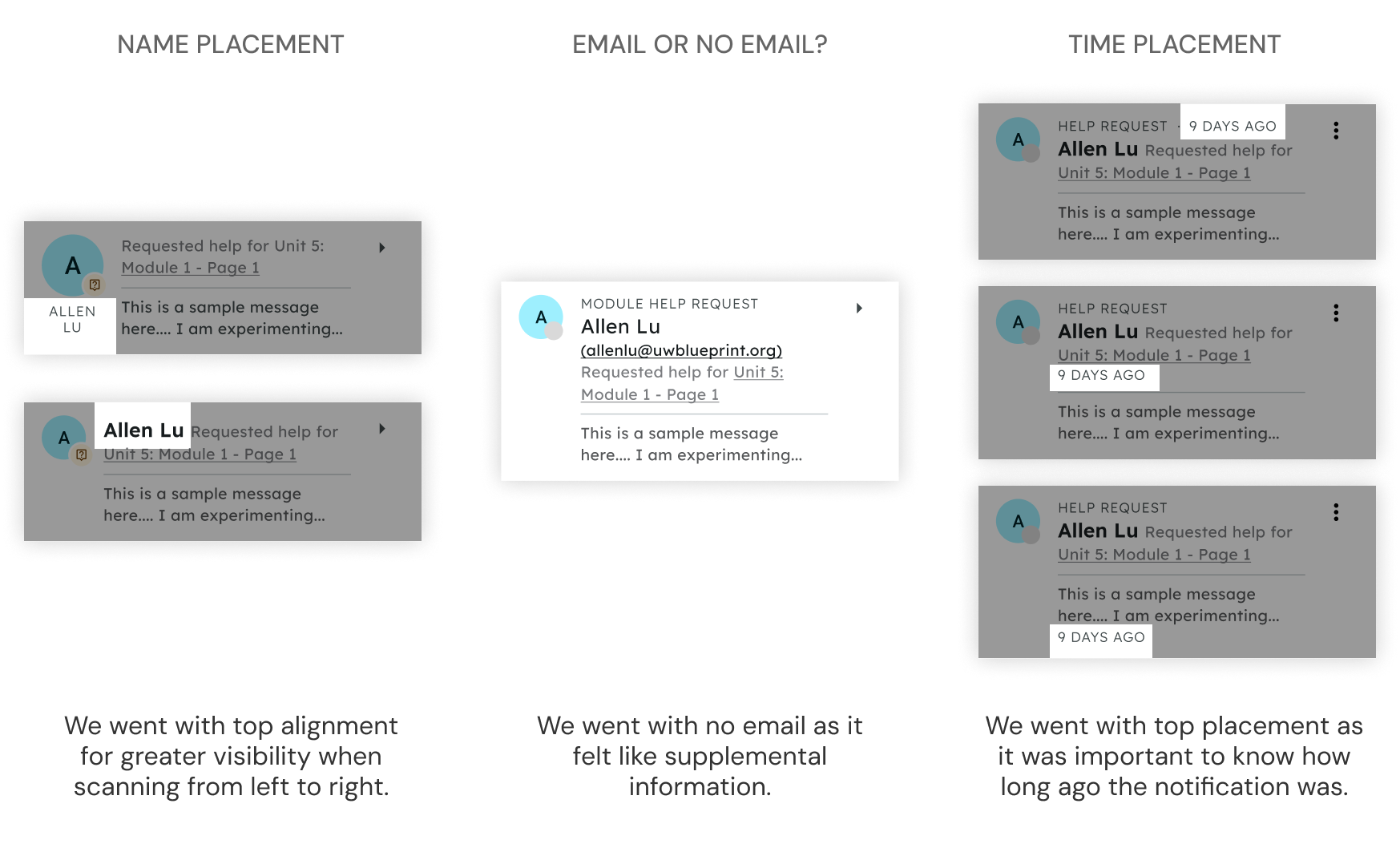
My PM let me choose how to show time. I used relative time in the navigation bar view to show what’s urgent, and a mix of relative time and exact dates in the ‘All Messages’ view so both recent and older messages are easy to understand.
HANDOFF

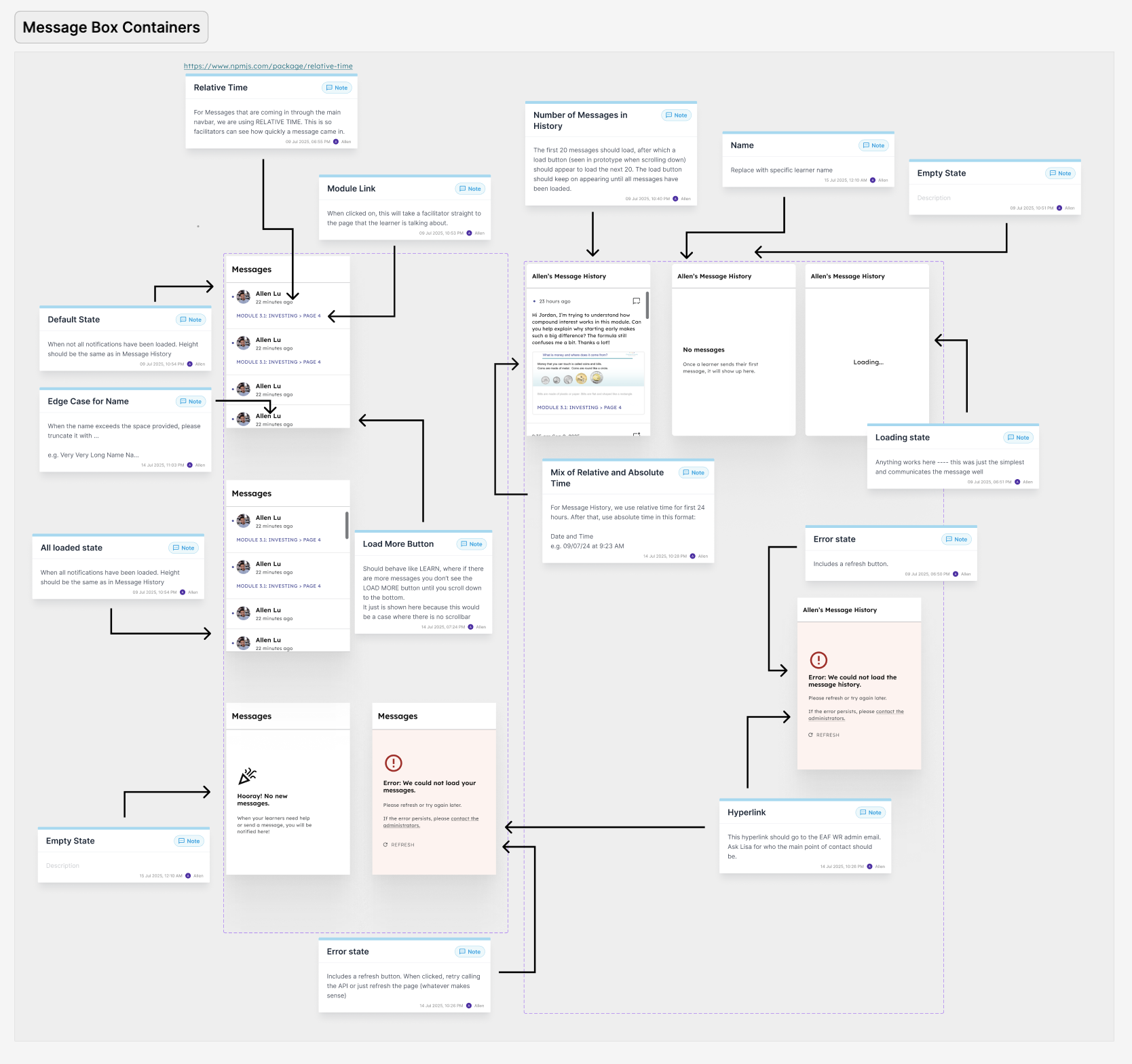
I liaised with developers and PMs to ensure proper implementation and edge case coverage.

I designed edge cases for the dashboard, ensuring that learners got contextual information depending on whether they were at the start or end of their journey.
I created Loading, Empty and Error states for Notifications, states that are especially important when Teachers need quick information in the classroom.
EXAMPLE OF DEV HANDOFF PROCESS
FINAL DESIGNS

I balanced user needs with developer capabilities.

DASHBOARD AND BOOKMARKS
NOTIFICATION SYSTEM
IMPACT

Positive reactions, positive impact.

“[Notifications are] one of the most well-designed features of our application.”

- Gaurav, Product Manager
These features are currently in development, with the full application scheduled to be launched in Winter 2026. Check out the GitHub repo!
Once completed, this will make a measurable difference for learners in EAF Waterloo Region’s Working Adults Learning Empowering Skills (WALES) Group, a collective of adults with disabilities who are eager to explore their own possibilities (including financial) in Waterloo Region.